



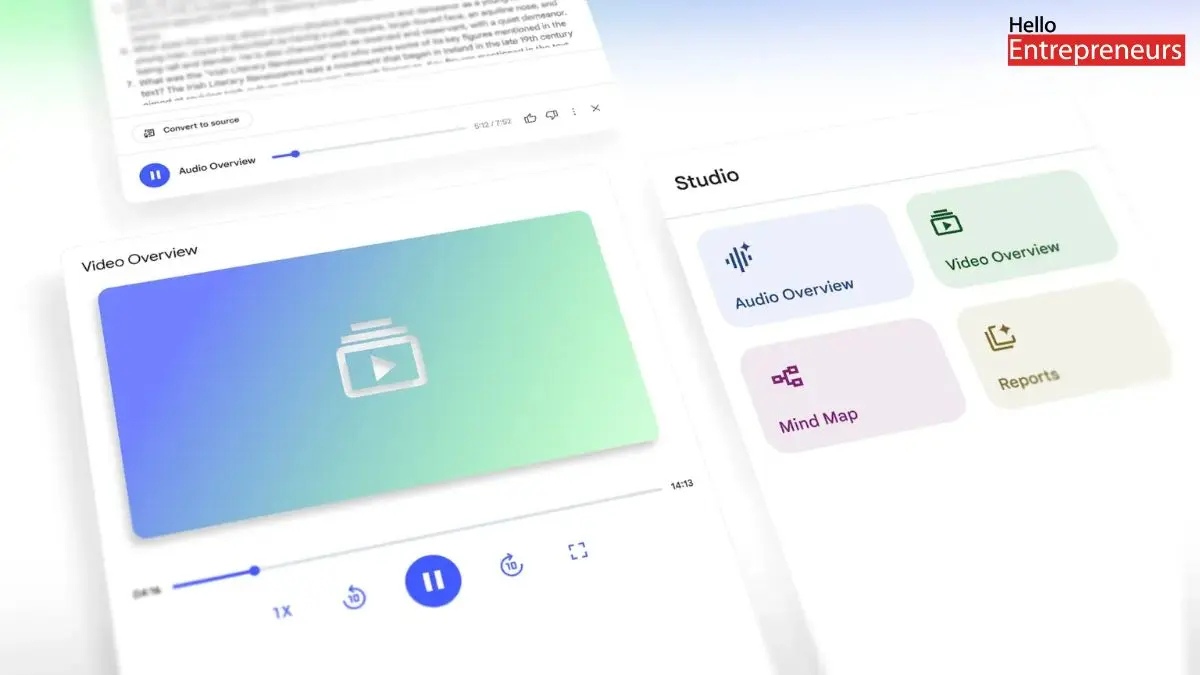
New Delhi: Google’s most popular AI-powered learning tool, NotebookLM, is getting a much big upgrade as now this AI tool can turn any uploaded documents into a video-guided slideshow, by this AI tool, people can understand the document in the form of video, by this user can understand easily without any problem, and learn the topics better and in an easy way. Google has introduced additional Video Overviews in their NotebookLM, which will turn any given topic or any document into a narrative video with images, diagrams, quotes, and data, tailored to the user’s learning needs.
Today, we’re introducing Video Overviews in @NotebookLM — a visual alternative to Audio Overviews. Dive deeper with short, engaging slide summaries using images, diagrams, quotes and data from your sources, narrated by your AI host. pic.twitter.com/FW6EdLE5CN
— Google (@Google) July 29, 2025
In a survey, there are many people who can easily understand any of the difficult topics if they get a video of that or any of the diagrams, they will understand the difficult topic in just a few minutes, so these AI tools will be the most useful things Google have introduced in their NotebookLM. Users can customise the video overviews in NotebookLM according to their preferences. User can tailor the video based on their knowledge level, learning goals, and target audience. Users can add a custom prompt to describe what exactly the users want to create with the video overviews.
However, Google is also bringing upgrades to the NotebookLM Studio Lab, by which users can find four distinct tiles at the top of the studio panel for creating Audio Overviews, Video Overviews, Mind Maps, and Reports. All of the content user can create will appear conveniently in the list below those tiles.
To boost their productivity further, users can now multitask within the Studio panel, letting users listen to an Audio Overview while simultaneously exploring a Mind Map or reviewing a Study Guide. The latest, redesigned Studio makes it easier than ever to take their source material and generate a whole collection of formats to understand and share.
This Video Overviews is already rolling out for everyone globally in the English language, meanwhile the improved studio tab will be coming out in the next few weeks. Note that users can generate Video Overviews only on desktop for now.

