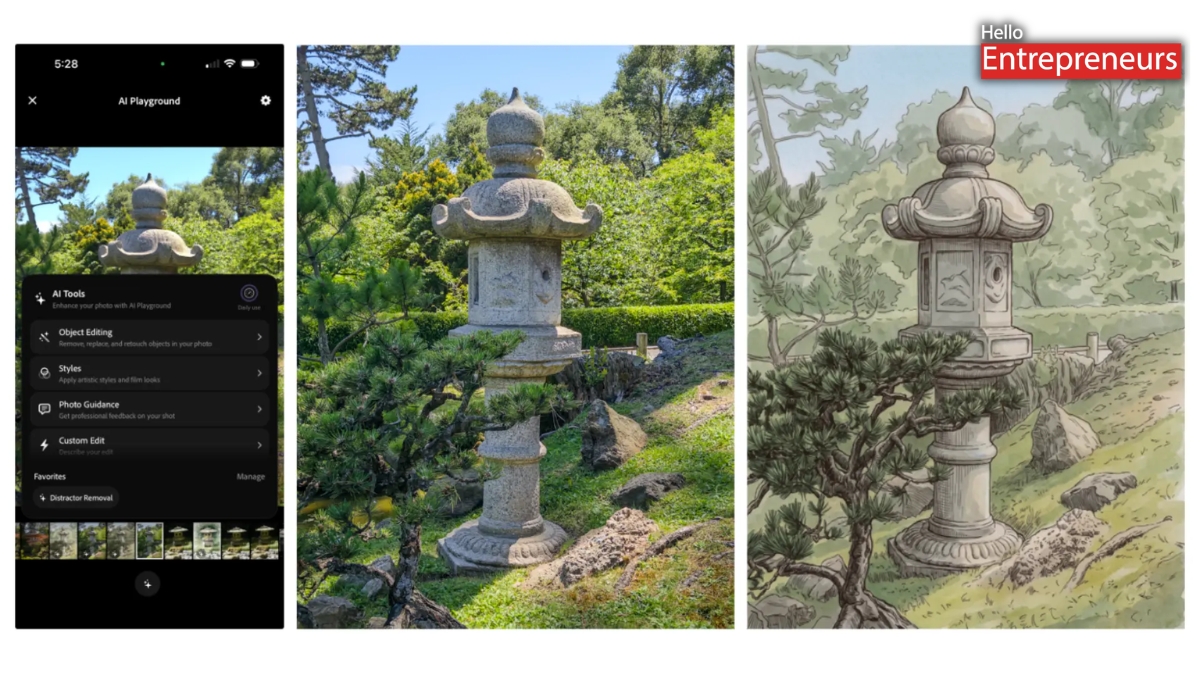








New Delhi: Adobe has recently released its AI Playground, a testing feature in Project Indigo 1.1 that adds generative AI-powered editing tools to its camera applications. This feature enables users to edit photos after capture without transferring them to a separate editing app or web service. Adobe’s NextCam Team released Project Indigo as a testing computational photography camera application.
It provides full manual controls, JPEG and RAW image capture, an SLR-like image rendering approach, and features such as removing reflections while photographing via windows. Adobe also stated that generative AI image editing has advanced, but prompt-based workflows still have limitations. Text prompts can produce different results depending on interpretation and context, often requiring multiple attempts. Existing workflows also require users to move images between camera and editing applications, making it difficult to edit photos while still at the shooting location.
AI Playground integrates generative AI editing and photography guidance into the camera workflow. AI Playground includes four sections:
- Objects Editing: It offers tools to remove unwanted objects and distractions, blur backgrounds to create a shallow depth-of-field effect, and remove selected distraction categories. Users can add custom categories via text or voice input and save or delete them.
- Styles: Applies photographic and artistic styles to captured images by using generative AI models that can recreate traditional artistic techniques.
- Photo Guidance: Analyzes photos and offers editing and reshooting suggestions while the users are still at the shooting location. Adobe is also working on customizing suggestions for individual phone models and lenses by including capabilities such as minimum focus distance. Adobe is exploring composition and cropping recommendations by using additional captured ultra-wide photos or videos.
- Custom Edit: It enables users to create edits by using their own simple text prompts. Prompts can be typed or dictated, then edited, saved, or deleted. AI Playground buttons use Adobe-engineered prompts, and users can repeat an operation to generate another variation.
After capturing a photo with Project Indigo, users can open it via the built-in filmstrip or full-screen gallery and access the AI Playground using the sparkle icon. This feature works only with photos captured using Project Indigo.
AI Playground initially uses Google’s Nano Banana image-generation model. Adobe stated it might switch models over time or use different models for specific features. Several tools might also use Adobe’s Firefly models, including object removal capabilities for removing distractions while preserving other parts of an image. This feature also uses cloud-based AI processing and requires an internet connection via Wi-Fi or cellular data. Generated images are returned at approx. 2K resolution to reduce the transmission and processing time.
The company is continuing to develop AI Playground with additional editing tools and photography guidance, which features common editing tasks and prompts. The Nextcam Team is also working on non-generative AI computational photography improvements, including low-light image quality improvements. Areas under development include: Generative editing controls, Identity preservation, and On-device AI models.
Adobe is working to add the Content Authenticity Initiative (CAI) metadata to AI-edited images that are created via AI Playground by Adobe. Several AI models used by the feature, including Nano Banana, are also going to apply invisible watermarks to generated images. Project Indigo’s AI Playground was developed by Mohammad Haque, Boris Ajdin, Ruiming Cao, and Marc Levoy with support from the Nextcam Team.
However, it is available as a free public experiment in Project Indigo 1.1. It is limited to selected users who receive an invitation after upgrading and reopening the applications. No account or sign-in is required. Participants must opt in to share anonymous usage analytics by including button presses. Adobe stated photos and prompts are not uploaded to its servers, reviewed by Adobe, or used to train AI models. Depending on the results, Adobe might expand the testing, expand access, conduct additional tests, or unveil a paid version.